- About
- Objective
- Features
- Documentation
- Documentation Builder
- Setup
- Setup Domain
- Page Builder
- BYOS
- LMS
- About LMS
- Creating Courses
- Course Management
- CMS
- Site Features
- Posts
- Media
- Live Customizer
- Workshops
- Zoom Meetings in AcademyLauncher
- Google Meet in Workshops & Google login
- Community
- Community features
- Users
- eCommerce
- Products
- Memberships
- Orders
- Subscriptions
- Payments
- Configuring Stripe
- Payment Settings
- Configuring Razorpay
- Reports
- Dashboard
- Course reports
- Administrator
- Policy
- Privacy Policy
- FAQ
- Default Storage
- Setting up site logo, title
- Customize Dashboard Menu
- Account
- Account workspace overview
- Manage plan, imports, policies, and ownership
- Manage workspace features
- Manage domains, URLs, and sitemap
- Manage data and privacy requests
- Configure role navigation
- Configure dashboard layout
About PageBuilder
After using so many page builders, we decided to build a page builder that is easy to use and yet provides all the features of the most page builders. We understand that our users are always short on time so we implemented easy to use features :
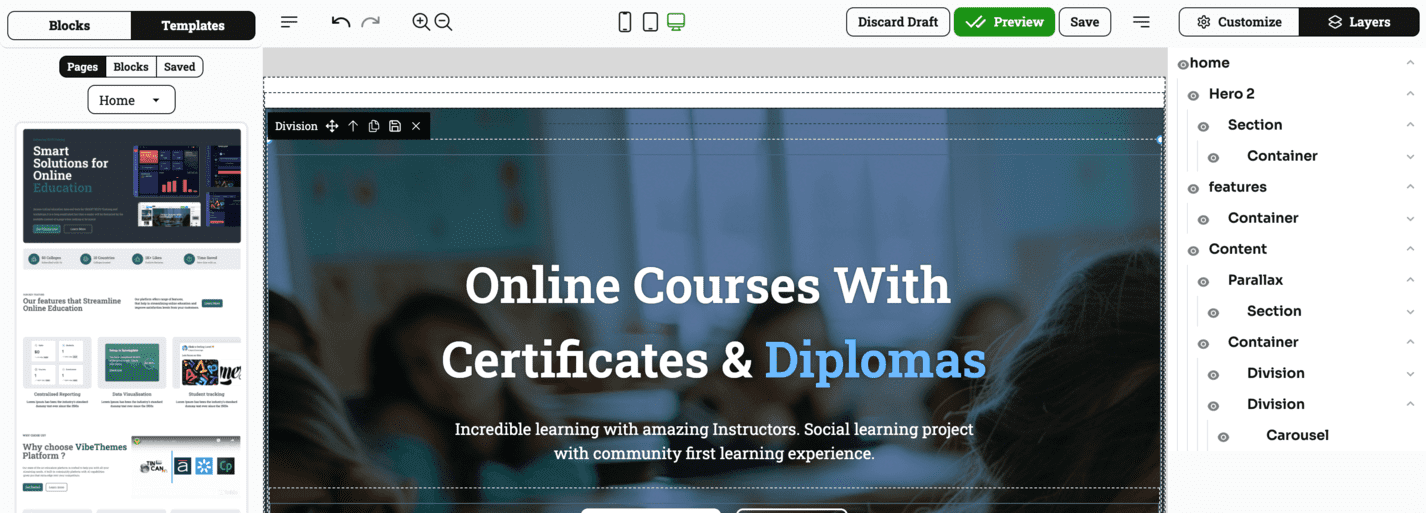
Our intuitive PageBuilder comes loaded with below features :
Drag-and-Drop Interface: Create pages effortlessly by dragging and dropping various elements like text, images, buttons, and more onto the canvas without any coding required.
Pre-built Templates: Access a library of customizable templates to quickly start building professional-looking pages for different use cases, such as landing pages, portfolios, or blogs.
Responsive Design: Ensure your pages look great on all devices with built-in responsiveness, allowing for seamless viewing on desktops, tablets, and smartphones.
Customizable Elements: Modify the appearance and functionality of individual elements (e.g., fonts, colors, spacing) to match your branding and design preferences.
Real-time Preview: See how your page will appear live as you build it, enabling quick adjustments and fine-tuning without switching between editing and preview modes.
SEO Optimization: Automatically optimize page structure and metadata for search engines to help improve your site's visibility and ranking.
Global Components: Reuse components like headers, footers, or call-to-action sections across multiple pages, ensuring consistency and saving time on repetitive tasks.
Flexible Layouts: Create custom layouts with grids, columns, and sections, giving you full control over how content is arranged on your pages.
Custom Code Integration: For advanced users, the ability to add custom HTML, CSS, or JavaScript for more flexibility and personalization beyond the standard tools.
Media Integration: Easily incorporate images, videos, and audio into your pages from a media library or external sources, enhancing your content’s visual appeal.
Inline Editing: Edit text, images, and other elements directly on the page without navigating to separate menus, streamlining the design workflow.
Undo/Redo & Revision History: Safeguard your progress with an undo/redo feature and a detailed revision history, allowing you to revert to previous versions if needed.
Plugin and Widget Support: Extend the functionality of your page builder by integrating third-party plugins and widgets, such as forms, analytics tools, or social media feeds.
Responsive Grid Control: Adjust layouts for different screen sizes using responsive grid controls, ensuring mobile and tablet optimization.
Save Custom templates : Create and save custom blocks right inside the page builder for re-use.