- About
- Objective
- Features
- Documentation
- Documentation Builder
- Setup
- Setup Domain
- Page Builder
- BYOS
- LMS
- About LMS
- Creating Courses
- Course Management
- CMS
- Site Features
- Posts
- Media
- Live Customizer
- Workshops
- Zoom Meetings in AcademyLauncher
- Google Meet in Workshops & Google login
- Community
- Community features
- Users
- eCommerce
- Products
- Memberships
- Orders
- Subscriptions
- Payments
- Configuring Stripe
- Payment Settings
- Configuring Razorpay
- Reports
- Dashboard
- Course reports
- Administrator
- Policy
- Privacy Policy
- FAQ
- Default Storage
- Setting up site logo, title
- Customize Dashboard Menu
- Account
- Account workspace overview
- Manage plan, imports, policies, and ownership
- Manage workspace features
- Manage domains, URLs, and sitemap
- Manage data and privacy requests
- Configure role navigation
- Configure dashboard layout
Edit Course
To edit course, you must first ensure you have the instructor role. The roles are defined by administrator in the Administration - Users panel with create course capability.
For Courses, you must also be set as a Course author. A Course can have multiple authors by default a person creating the course is set as a Course author, however, she has the option to remove herself from the course author and set someone else.
The site administrator by default is course author for all the courses published on the site.
To edit a course, head over to instructor panel.
This panel would show courses which you can access.
Locate the action menu items of the course you want. to edit and click on Edit course
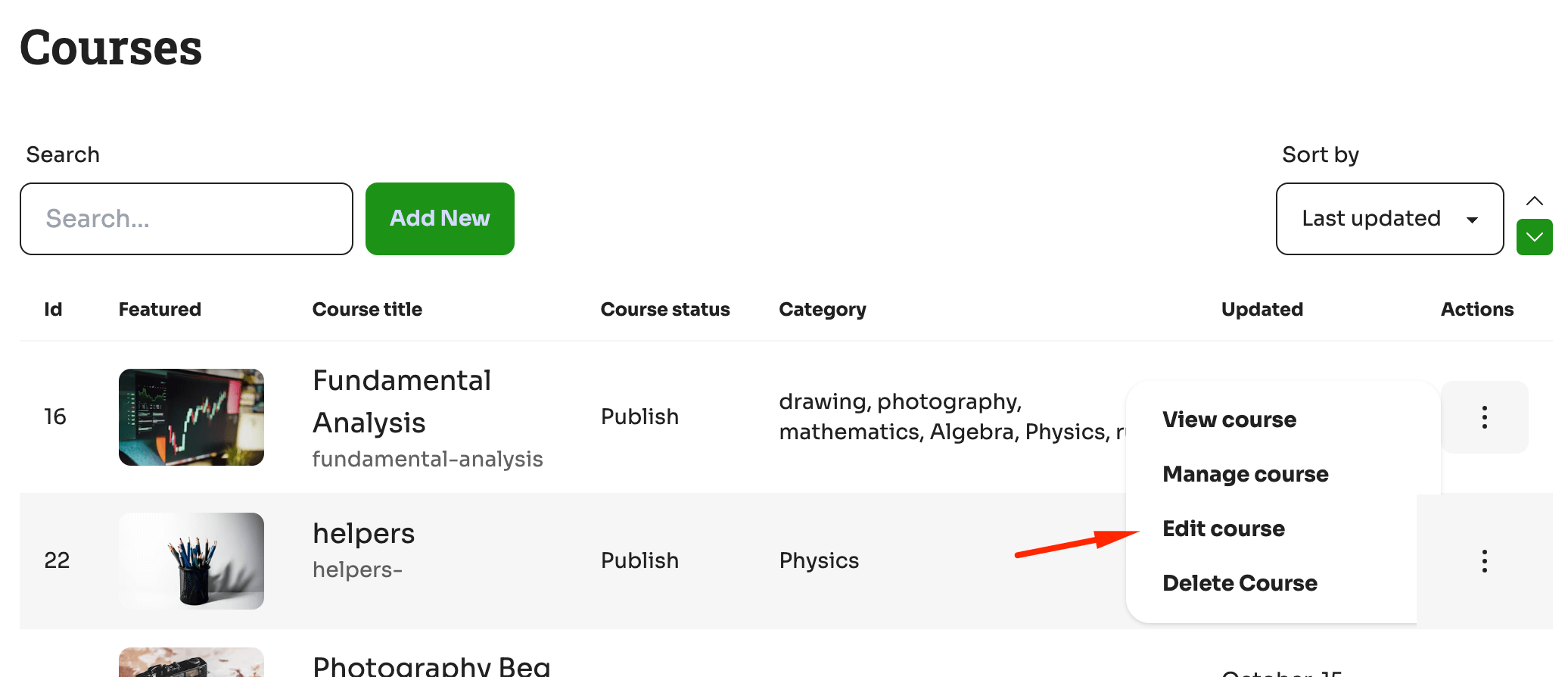
on clicking you will land on the Edit course panel.
The edit course is divided into 5 parts.
a. Course essentials
b. Landing Page : Describe the Course
c. Settings : Configure Course settings
d. Curriculum : Set the curriculum of the course
e. Pricing : Set how users can pursue this course.
.png)
In the first section
Course Essentials
User can change the Name of the course
Configure Course slug , the part of the url to identify the course
Configure Course categories, you can add course categories, however, to manage the course categories, that is to configure an image, or delete a course category you will need to go to Administrator menu - eLearning - Category.
Write a short description , which would be used for searching this course
Set total number of seats of the course. This is the maximum number of users who can take this course. If the number goes beyond then the customers face an error earning.
Set a course start date : Configure when teh course starts
Set co-Instructors for the course, here you can add, remove members to add then to the course.